July 2026 Enterprise Releases
1783525088549
HeyGen has moved to a monthly release cadence for enterprise. Explore key upcoming features and deprecations for July 2026.
1. Feature updates
A) Enterprise plan features
Audit Logs
What's new
The enterprise audit log now shows clean, human-readable activity names — like "Changed role for [email protected]," "Invited team member(s)," or "Updated workspace MFA settings" — instead of raw API paths.
How it works
The audit log tracks activity across the workspace, with event categories including but not limited to:
Workspace settings — SSO configuration, MFA changes, watermark toggles, workspace renames
Team management — invitations, removals, role changes, quota updates, ownership transfers
Videos — sharing, deletion
Avatars — creation, modification, deletion, photo uploads
Projects — creation, duplication, moves, restores, deletion
Approvals — requests, decisions, withdrawals, admin overrides
Billing — plan switches, pauses, cancellations, resumptions
Security — login activity, API key creation, email changes
Admins can narrow the log using several filters: filter by event type to isolate specific actions like role changes, SSO updates, or approval decisions via a multi-select dropdown; filter by team member to see all activity from one or more users; and filter by date range to scope the log to a specific window. Parent workspace admins automatically see activity rolled up from all subworkspaces in a single view, and the full log can be exported to CSV for reporting.
Why it matters
As organizations scale, tracking who did what — and when — becomes essential for security, governance, and compliance. A readable, filterable audit log gives admins clear visibility into workspace activity and provides exportable records to support compliance and audit requirements.
Sub-Workspace Usage View in Settings
What’s new
The Usage & History experience has been upgraded for both parent workspace and sub-workspace admins, with richer reporting and analytics that give clearer visibility into how resources are being consumed across the organization.
How it works
Parent workspace admins get a new resource consumption graph that lets them compare usage across all sub-workspaces at a glance. Sub-workspace admins get detailed usage analytics within their own workspace, including breakdowns by member and by feature.
Why it matters
As organizations distribute work across sub-workspaces, it becomes harder for admins to track where resources are actually going. These enhancements give both levels of admin a clearer, more actionable picture of consumption — whether you're overseeing the full organization or managing a single team — making it easier to allocate resources, spot inefficiencies, and plan ahead.
New Developer Entry Point in Settings
What’s new
The API, Agentic Skills, and Connections tabs have moved out of the enterprise settings modal and into the dedicated Developers section in the home sidebar — keeping settings focused and giving developers a single, consistent place to find everything they need.
Brand System Creation from Uploaded PPT Files
What’s new
When uploading a PowerPoint file through the PowerPoint to Video flow, you'll now see a prompt directly in AI Studio at the top of the screen — "We found brand colors and fonts in your uploaded presentation" — with a quick Save brand option. Once you click this, a "We found your brand assets" modal will appear, giving you a head start on building your brand system directly from your presentation.
From the modal, you can review and edit:
Colors — primary, secondary, accent, and tertiary colors are automatically detected from your file, with the ability to edit via color picker, delete, or add any colors that weren't picked up
Typography — review and adjust the title and body text fonts detected from your PowerPoint
B) Other core product updates
Video Translation Flow Re-Design
The Video Translation page has a refreshed design with a number of layout changes. Notable ones below:
New entry point - Translate is no longer in the left nav bar. It now lives under Apps → Translate Videos in All Apps
Cleaner engine selector - the old Audio-only / Speed / Precision toggle has been simplified into a single model selector. Audio-only remains its own option; Speed and Precision are both lip-sync modes, so pick whichever you were using before
Advanced settings are now a modal - previously a toggle on the main page, advanced settings (dynamic duration, collections, remove background sound, source transcript, brand cluster input) now open in a dedicated modal via a button at the bottom of the settings panel
Local voice file has moved - if you upload your own voice file, it now appears in its own spot and replaces the output language selector (since language selection is no longer relevant when using a local voice)
Video trim is on the thumbnail - the trim control has moved to sit directly on the video thumbnail rather than as a separate element
2. Key Deprecations
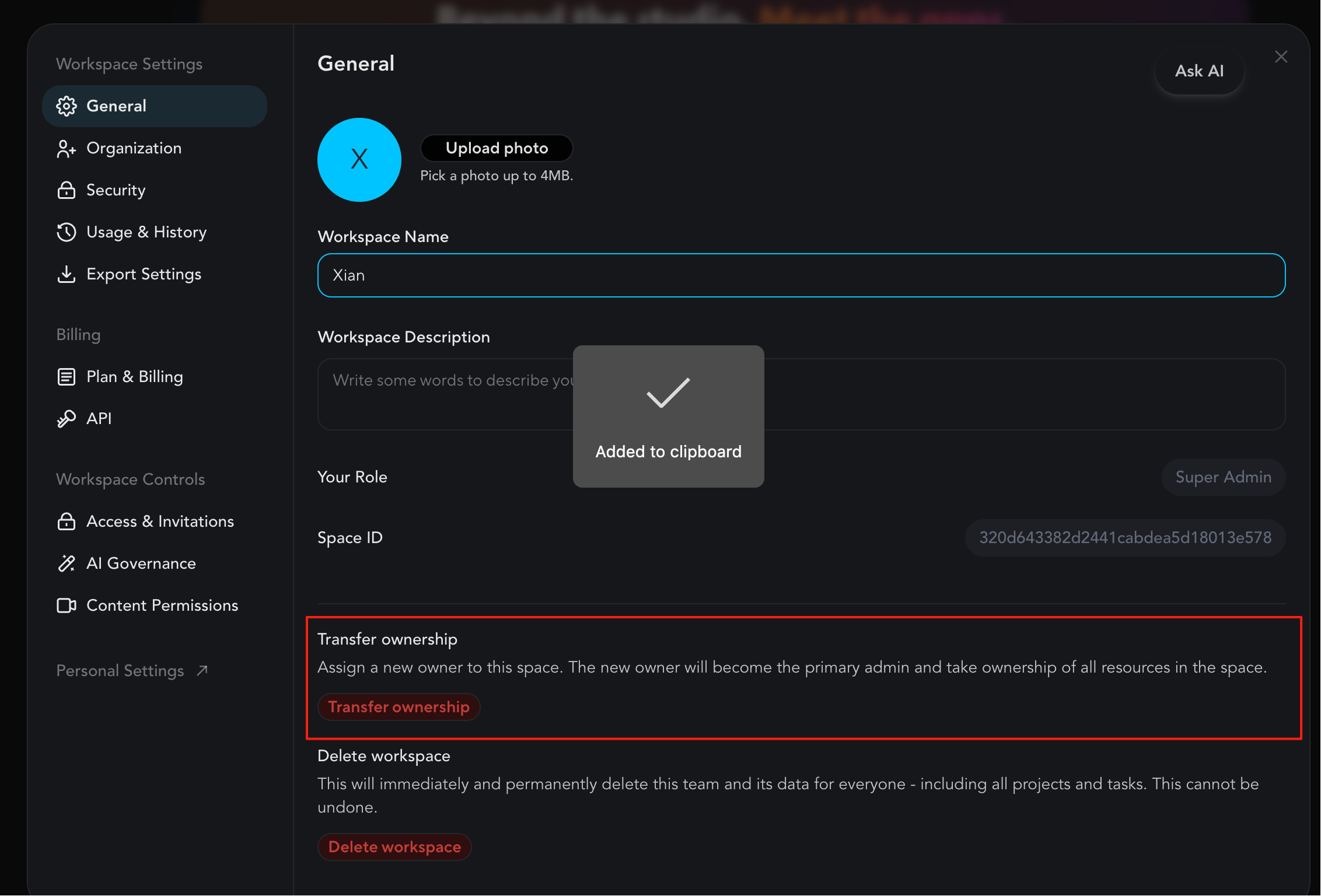
Transfer ownership flow from settings REMOVED
As of this month, all Super Admins have equal, full permissions in a workspace — there is no single "owner" account with elevated rights above the others. We've deprecated the Transfer Ownership setting as a result, because there's no longer a distinct ownership role to transfer. The control implied a hierarchy that no longer exists, so keeping it would only cause confusion. To hand off control of a workspace, grant Super Admin to the new person and remove it from whoever's stepping away — the outcome is the same as a transfer used to be.
Did you like this update?


Leave your name and email so that we can reply to you (both fields are optional):
