June 2026 Enterprise Releases
1780416000000
HeyGen has moved to a monthly release cadence for enterprise. Explore key upcoming features and deprecations for June 2026.
1. Feature updates
A) Enterprise plan features
Settings redesign
What's new
We've completely redesigned Settings to make it easier for users and admins to find what they're looking for. Settings are now organized into two distinct views: Personal Settings and Workspace Settings.
How it works
Personal Settings contains settings that apply only to the individual user, including Account, Preferences, Personalization, Connections, and Agentic Skills.
Workspace Settings contains settings related to the workspace itself, giving users a clearer separation between managing their own experience and managing shared workspace resources. Admins will also see a new Workspace Controls section here for managing workspace-wide policies and permissions.
Why it matters
As organizations grow, managing users, workspaces, permissions, governance, and resource allocation becomes increasingly complex. This redesign creates a more intuitive and scalable admin experience by organizing related settings together, improving visibility across the organization, and providing admins with centralized controls to manage their workspace more effectively.
Organization overview
What's new
We've redesigned the Organization experience by consolidating the previous Members and Sub-Workspaces sections into a single Organization tab within Workspace Settings.
The new Organization tab provides admins with a centralized view of their entire workspace structure, making it easier to manage teams, members, and sub-workspaces from one place.
How it works
The Organization tab now begins with a Team Overview section, where admins can view their complete workspace hierarchy, including the parent Workspace and all associated Sub-Workspaces.
Admins can now:
View and manage all sub-workspaces from one place
See member counts across workspaces
Create new sub-workspaces
View members across the entire organization
Filter members by workspace
Usage and history enhancements
What's new
We've expanded the Usage & History experience to help parent workspace admins better manage resources across their organization.
Improvements include:
New Usage Limits section for managing Digital Twin, Video, and API credit allocations across sub-workspaces
Ability to restrict sub-workspaces to their own allocated usage limits - note this is disabled by default! If you wish to prevent sub-workspaces from using parent space usage limits, you need to turn on this toggle.
Workspace controls
What's new
We've introduced a new Workspace Controls section for admins, bringing workspace governance and permission settings into a dedicated area.
How it works
Workspace Controls includes three sections:
Access & Invitations – Centralizes controls related to workspace membership and access management. Admins can configure: invitations, public invite links, and sub-workspace access. This gives admins greater control over how users enter and move throughout their organization.
AI Governance – Provides a centralized place for admins to manage how AI-powered features are used across their workspace. Admins can control: AI model access, avatar creation permissions, translation settings, watermark requirements, and other AI-related policies. These controls help organizations align HeyGen's AI capabilities with their internal governance, compliance, and brand requirements.
Content Permissions – Governs how content is created, shared, published, and distributed across the workspace. Admins can configure: project visibility, brand system creation, video approvals, downloads, publishing, and social sharing. This allows organizations to maintain greater oversight of content creation and distribution workflows.
Image watermarks for AI-assisted videos
What's new
AI-assisted video watermarks now support both text and image-based watermarks.
Admins can upload a custom image, preview how it will appear, and automatically apply it to downloaded videos when watermarking is enabled.
Why it matters: Organizations now have greater flexibility to meet branding, transparency, and governance requirements for AI-assisted content.
B) Other core product updates
New Brand section
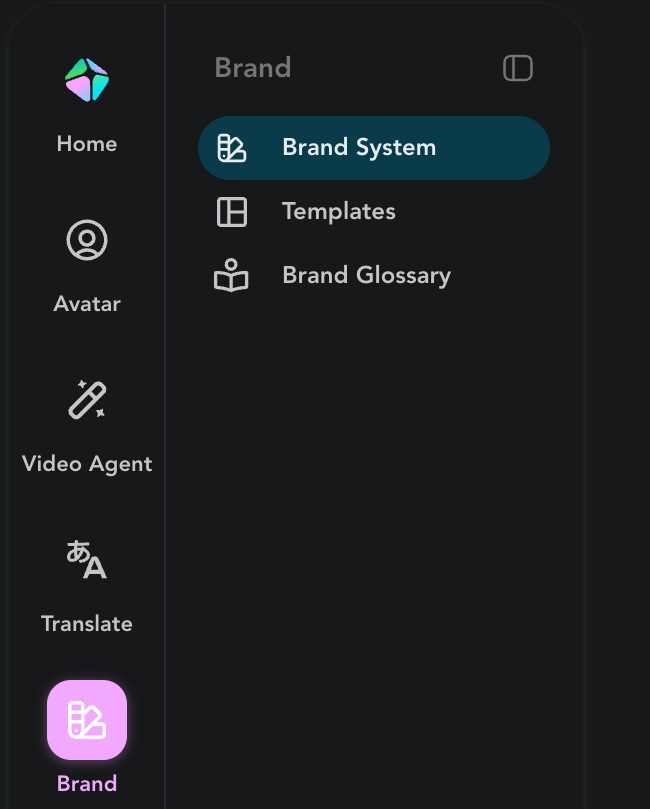
What’s new: A Brand section has been added to the left nav of the app. Now enterprise users can directly click here to access: 1) Brand Systems, 2) Templates, and 3) Brand Glossary.
Voices tab refresh
What's new: Voices now has its own dedicated tab in the left rail. Previously, you could only reach voices inside a video workflow or under the Avatars tab — meaning you basically had to be building an avatar video to get to them. Now it's one click to a full voice library, no avatar project required.
What you can do from the new tab:
Open a complete voice library and flip between My Voices and HeyGen's library
Search voices by name
See how each voice was created at a glance
Clone your own voice, design a new one, or import from a third party — all right here, without starting an avatar project
The browsing experience also gets a visual refresh, with a cleaner voice library laid out in the avatar page's left-rail.
2. Key deprecations
Custom GPT integration REMOVED
The Custom GPT integration and its in-app setup have been removed. Customers who relied on Custom GPT should migrate to the HeyGen ChatGPT App, which supports everything the Custom GPT integration could do via MCP. Existing workflows should be re-pointed to the ChatGPT App; no functionality is lost in the move.
Script .docx upload SUNSET
Direct .docx script upload is being retired. Starting June 1, 2026, uploading a .docx script will return a clear sunset message with a documented migration path: paste your script content directly, or upload it as a .txt or .md file instead. This now applies to all workspaces, including Enterprise, which were previously on the legacy upload path. Scripts already imported are unaffected.
Did you like this update?


Leave your name and email so that we can reply to you (both fields are optional):
